Count the tile, price the job, send a clear proposal.
TileCount turns floor, wall, backsplash, shower, and surround measurements into tile
boxes, grout, thinset, substrate, waterproofing, labor, and a job price, then into a
proposal your customer can read. It works offline, and your jobs stay on your device.
Estimates depend on the measurements, pricing, labor rates, waste factors, substrate
choices, and assumptions you enter. Verify all quantities, codes, manufacturer
instructions, taxes, and jobsite conditions before ordering materials, signing an
agreement, or starting work.
What is in the App Store today, and what is coming
The App Store version already has the free calculator, saved jobs with multiple
spaces, pricing, quote review, a client proposal PDF, and a separate internal worksheet.
Sections on this page marked Upcoming update describe the next
version, which has not been released yet. The screenshots and the sample proposal below
come from that upcoming version and use a fictional job.
Free
Calculator and your first job
The one-surface tile calculator is free. So is your first saved job, complete with
multiple spaces, customer details, pricing, quote review, and both PDF exports.
Deleting that job does not give you another free one.
Pro
Unlimited jobs and company defaults
TileCount Pro is a one-time in-app purchase through the App Store. It unlocks
unlimited saved jobs and reusable company defaults: your company profile and logo,
price book, quote settings, and terms.
How a job goes
From a quick count to a reviewed proposal
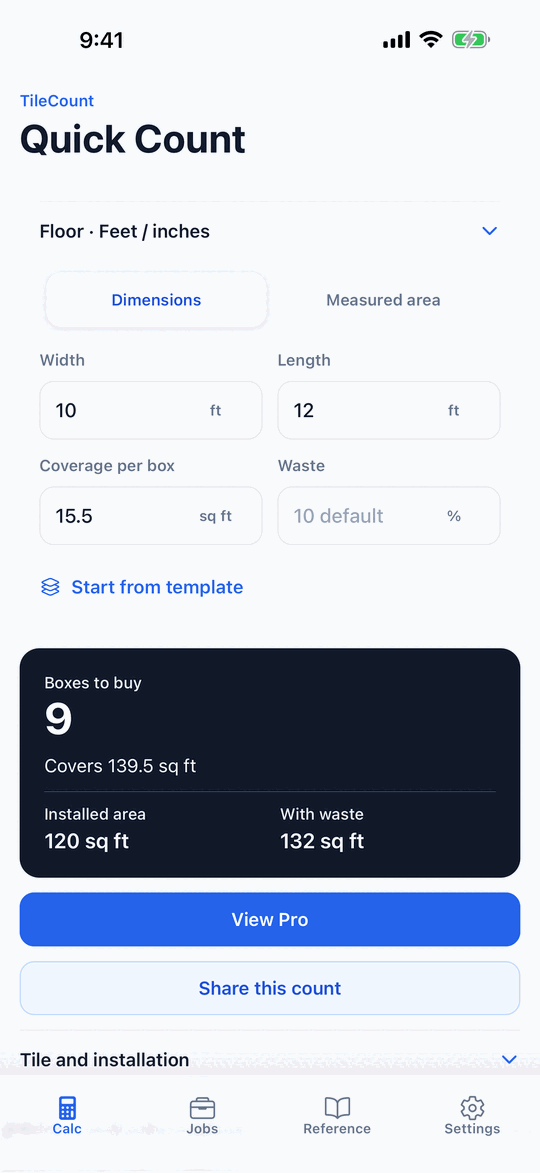
Quick Count
Enter a width, a length, and the coverage printed on the box. TileCount adds the
waste for your layout pattern and rounds up to full boxes. The current App Store
version calls this screen Quick Calc.
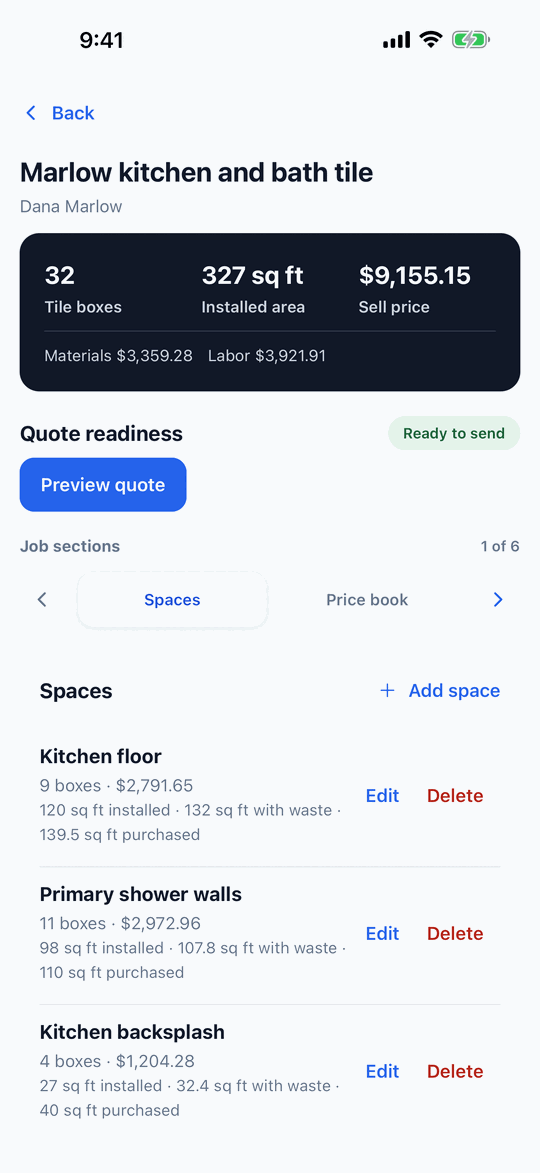
Saved job, many spaces
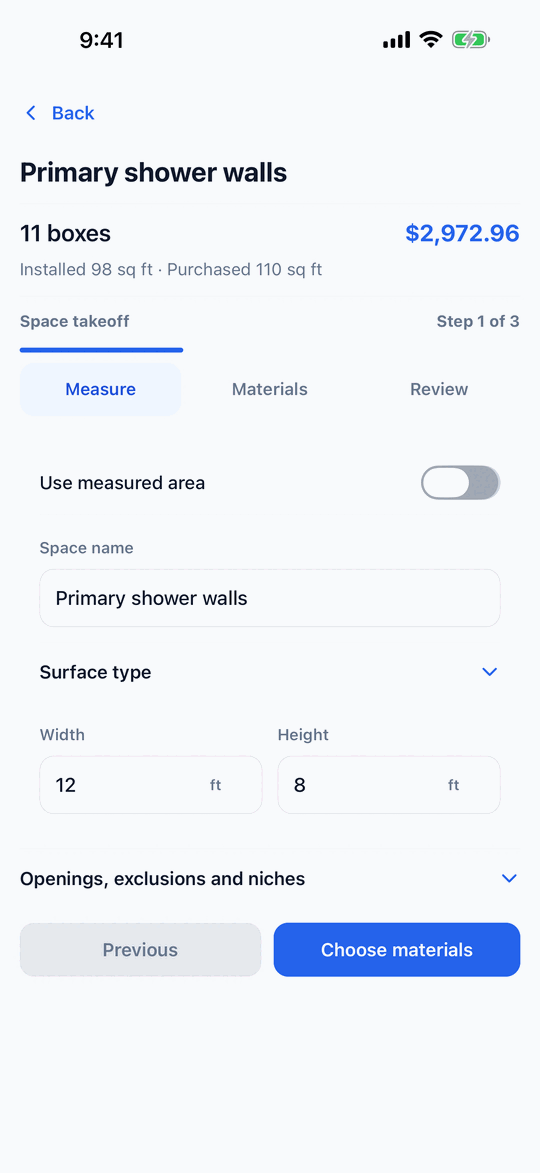
Put the kitchen floor, the shower walls, and the backsplash in one job. Each space
has its own tile, pattern, openings and niches, substrate, and waterproofing.
Your prices
Use your own tile and material prices, labor rates, markup, and tax. TileCount does
not supply live supplier pricing; the numbers are the ones you enter.
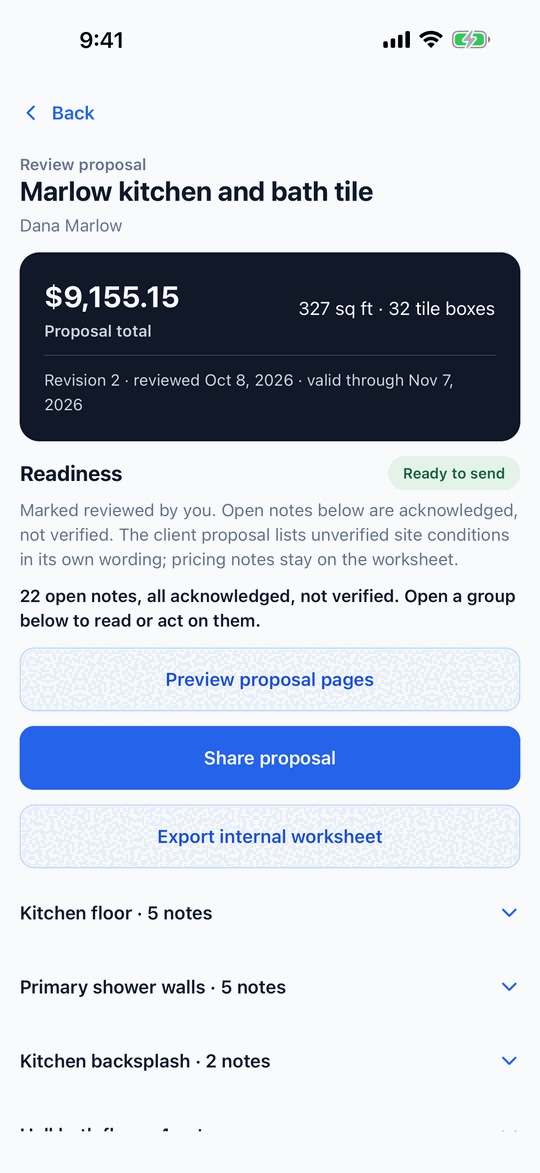
Review before it goes
TileCount lists what is missing and what has not been checked. The client proposal
can be shared only after you mark the quote reviewed, and changing its spaces, prices,
or quote settings asks for review again. Reviewing is your acknowledgment; it does not verify site conditions.
Client proposal
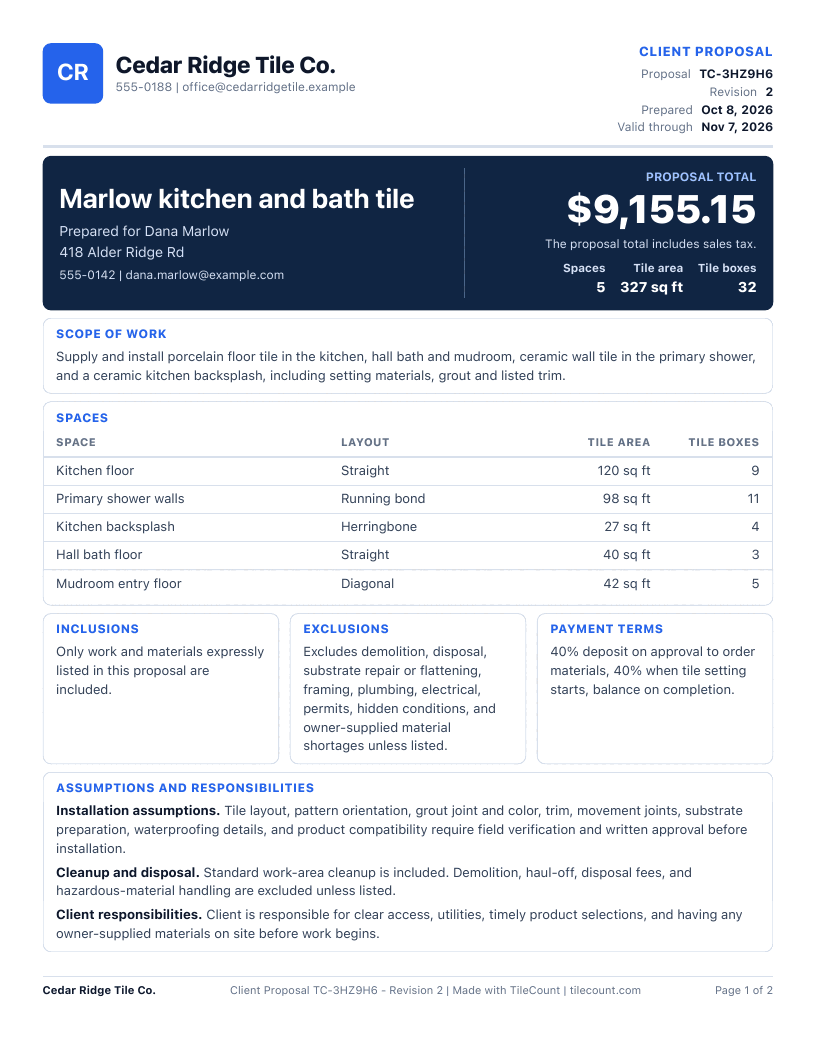
Scope, spaces, inclusions, exclusions, terms, and one total, with signature lines.
Your markup, margin, and unit prices are not printed on it.
Private internal worksheet
A separate PDF for you: material breakdown with quantities and prices, labor,
markup, margin, and the calculation assumptions behind each space.
Upcoming update
What the next version changes
Not yet in the App Store. These changes are in final testing and are planned for the
next release.
A shorter client proposal
The sample five-space job below prints on two pages. Long scope and terms continue
onto additional pages rather than being truncated. Pages are numbered, and each
reviewed revision keeps its own number and dates.
Site conditions in plain words
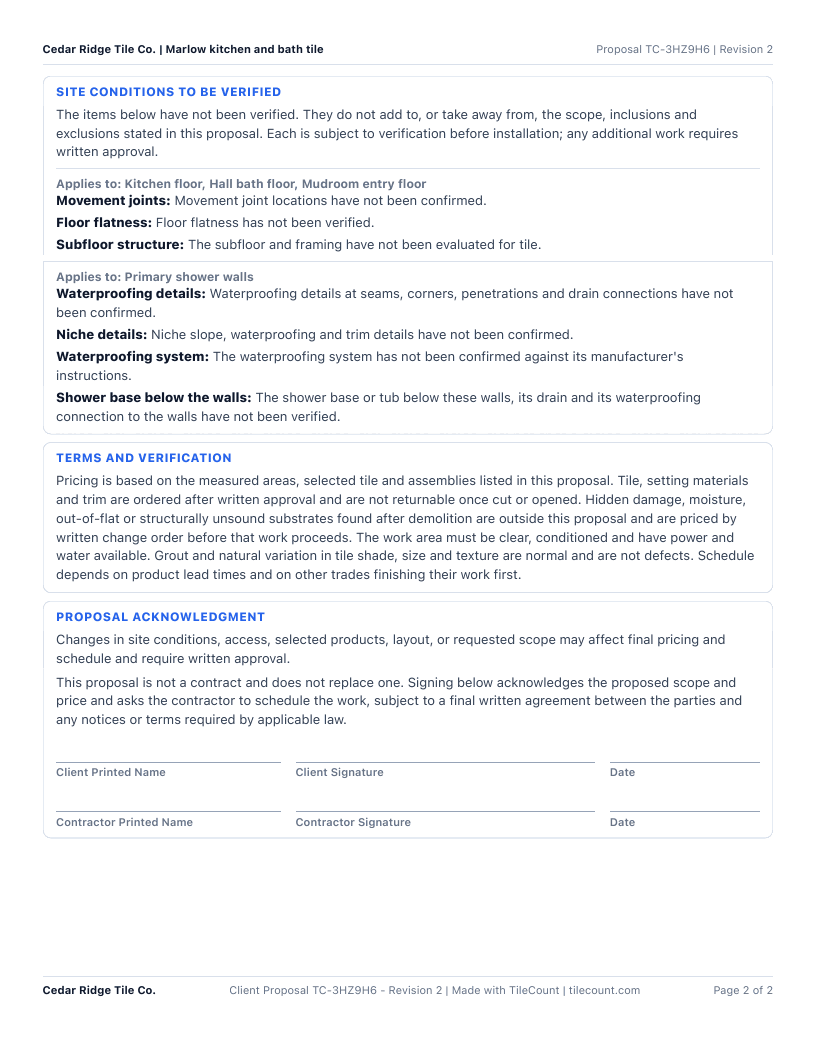
Conditions that have not been verified are listed on the proposal by the spaces
they apply to, worded as open items, not as promises.
Material quantities stay internal
The material quantity table moves off the client proposal. The full breakdown
stays on the internal worksheet.
Grout and mortar corrections
The generic cement grout allowance and mosaic joint math are corrected, and mortar
under uncoupling membrane and floor backer board is counted. Saved jobs keep their
numbers until you choose to update them.
More shower assemblies
Foam backer board, new backer over open framing, sheet membrane over wall board
where the manufacturer allows it, and shower floors over wood framing.
Easier review
Share actions come first on a reviewed quote, notes are grouped by space, and you
can preview the proposal or export a draft worksheet before review. Improved large-text
layouts for quote review and settings.
Quick CountOne job, five spacesMeasure, materials, reviewReviewed and ready to send
Screens from the upcoming version, showing a fictional company, customer, and job.
Upcoming update
Sample client proposal
A proposal produced by the upcoming version for a fictional five-space job. The company,
customer, address, and prices are made up.
Page 1: who, what, and one totalPage 2: open site conditions, terms, signatures
Straight, stacked, diagonal, running bond, herringbone, and chevron waste defaults.
Tile box rounding
Converts waste-adjusted area into full box quantities so the order matches the shelf.
Assembly reminders
Wet-area waterproofing, floor uncoupling, backer board, and natural stone review prompts.
Offline-first
Your jobs stay on your device
No account, no cloud
Saved jobs and settings are stored locally on your device. There is no sign-in and
no cloud sync, so estimating does not depend on a connection. Buying or restoring
Pro goes through the App Store.
No analytics or ads
The app does not use third-party analytics, advertising SDKs, or cross-app
tracking. See the Privacy Policy for the details.
FAQ
TileCount questions
What is free, and what requires Pro?
The calculator is free, and so is your first complete saved job, including spaces,
pricing, quote review, and both PDFs. TileCount Pro, a one-time in-app purchase,
unlocks unlimited saved jobs and reusable company defaults.
Is the client proposal always two pages?
No. In the upcoming version an ordinary job like the five-space sample prints on two
pages, but long scope, terms, or many spaces run onto more pages so that nothing is
dropped.
Are TileCount estimates guaranteed?
No — TileCount provides estimates based on the measurements, pricing, labor
rates, waste factors, assemblies, and assumptions entered by the user. Always verify
quantities, dimensions, prices, taxes, manufacturer instructions, local code
requirements, and jobsite conditions before ordering materials, signing a contract, or
starting work.
Does TileCount collect job data or use analytics?
No. In the current release, TileCount stores saved jobs and settings locally on your
device and does not use third-party analytics, advertising SDKs, user accounts, or
cloud sync.
Does the customer see my markup?
No. The client proposal shows one total. Markup, margin, unit prices, and the cost
breakdown are on the internal worksheet, which is a separate PDF.